
2:58 p.m.
Hi everyone,
I want to share an update regarding upcoming enhancements to the eRA system that will
improve the login experience and streamline account management for users.
1. Account Consolidation: Launching in late March 2026, users can consolidate multiple
eRA Commons accounts into one, which can be mapped to Login.gov.
2. Login Experience Updates: Upon login, users will have the option to consolidate
accounts. They can choose to dismiss this prompt if they do not need to consolidate. The
option will always be available in the menu.
3. Consolidation Process: Users must provide usernames and passwords for each account
to consolidate. They will choose a primary account, and a notification will follow the
review process.
4. Role Selection: Users with multiple roles or affiliations will select their
Organization and Role Category upon login, with an option to save a default selection for
future logins.
5. Reviewer Access: Reviewers can quickly access Peer Review materials by selecting an
option to bypass the Organization and Role selection step.
If you have any questions, please reach out to the See Need
Help<https://www.era.nih.gov/need-help> page. Submit a web
ticket<https://public.era.nih.gov/submithelp>;; or call Toll-free: 1-866-504-9552,
Phone: 301-402-7469. The Service Desk hours are Mon-Fri, 7 a.m. to 8 p.m. ET.
Evelyn Vanderburg
Training & Financial Compliance Coordinator
Office of Sponsored Project (OSP)
The University of Texas at San Antonio
One UTSA Circle
San Antonio, TX 78249
O: 210.458.7049 |
utsa.edu
[cid:image005.png@01DCA56A.CF5FF100]
From: eRA Information - Public <ERA-INFORMATION-L(a)LIST.NIH.GOV> On Behalf Of eRA
Communications Office
Sent: Tuesday, February 24, 2026 7:56 AM
To: ERA-INFORMATION-L(a)LIST.NIH.GOV
Subject: [EXTERNAL] eRA Enhancements: Ability to Consolidate Multiple Accounts
**EXTERNAL EMAIL**
This email originated outside of The University of Texas at San Antonio.
Please exercise caution when clicking on links or opening attachments.
[eRA logo: Collaborating for a Transformative Tomorrow]
Tuesday, February 24, 2026
eRA Enhancements: Ability to Consolidate Multiple Accounts
We are excited to announce that a release scheduled for late March 2026 will enhance eRA
Commons so that users will only need a single set of eRA Credentials. This enhancement
will allow users with multiple accounts to consolidate into a single account that can then
be mapped to Login.gov. If you are an eRA Commons user with multiple accounts, we
encourage you to consolidate your accounts as soon as possible. This enhancement will
also present users with the ability to select which Organization and what Role Category
(ex: Signing Official vs PD/PI) they will be using and set a default.
Changes to the Login Experience - Account Consolidation Option
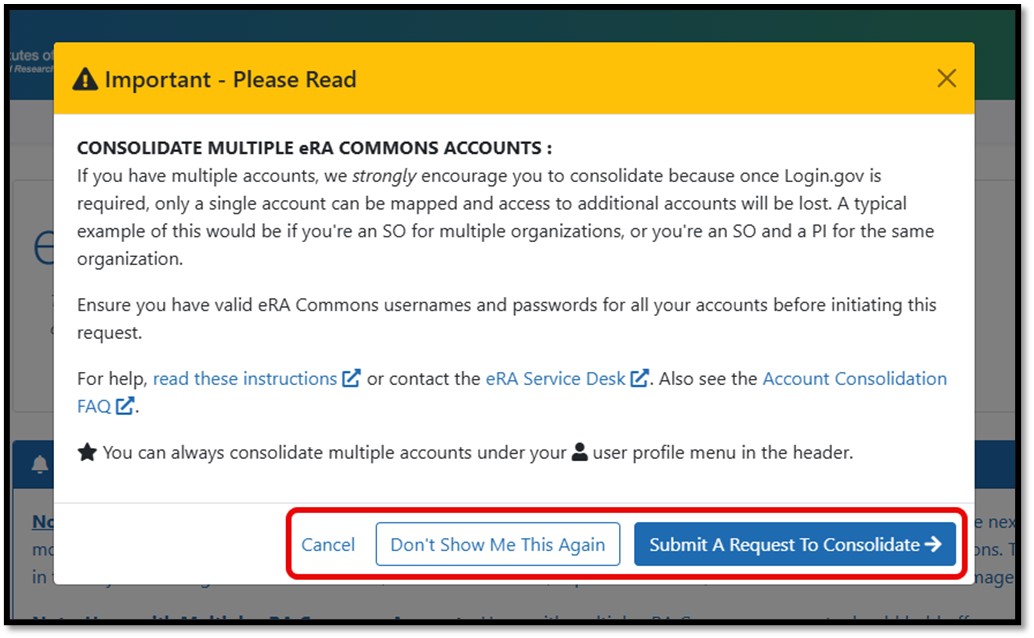
All users will be presented with the option to consolidate accounts following login to eRA
Commons. If a user does not need to consolidate accounts, they may select "Don't
Show Me This Again" to remove the window from their login experience. The option to
consolidate will always be available under the person icon on the menu bar at the top
right of any page in eRA Commons. It is important to remember that only a single eRA
Commons username can be associated with a Login.gov account.
[Consolidate Multiple eRA Commons Accounts modal. Highlighting the Options of Cancel,
Don't Show Me Again and Submit A Request to Consolidate.]
Figure 1: Consolidate Multiple eRA Commons Accounts Window
Account Consolidation Process
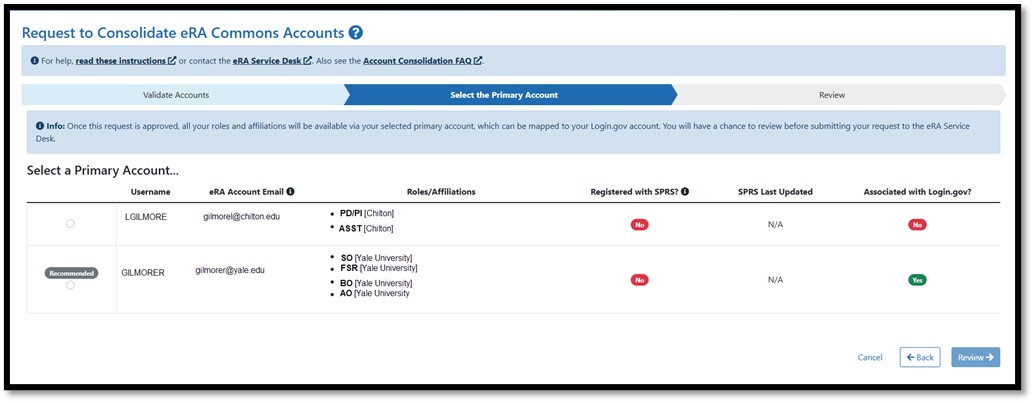
To consolidate two or more accounts the user must supply the username and password for
each account. Following verification, the user will be guided to select their primary
account. After completing review, the request will be sent for processing. The user will
receive a notification from eRA Commons and the Service Desk for tracking. Once eRA
reviews and processes the request, this will be the users only account.
[Request to Consolidate eRA Commons Accounts Screen second step showing selection of the
Primary account.]
Figure 2: Request to Consolidate eRA Commons Accounts Selection Screen
Changes in Login Experience - Accounts with Multiple Role Categories and/or Affiliations
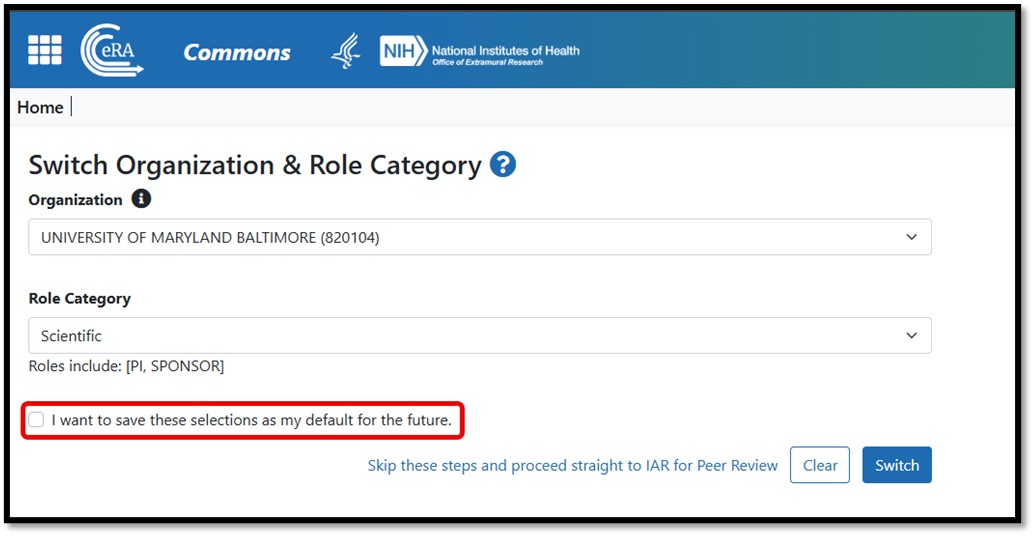
To simplify the flow for users with multiple affiliations and/or roles, the login
experience will be updated. Upon login users with multiple affiliations and/or role
categories will be asked to select which Organization and Role Category they will be using
during their session. Users will have the option to save a selection as their default to
skip this step in the future. Users can change their selection at any time by navigating
to the Change Organization/Role function under their person icon at the top right of the
page menu bar.
[Switch Organization and Role Category Screen highlighting the I want to save these
selections as my default for the future checkbox.]
Figure 3: Switch Organization & Role Category Screen
For Reviewers
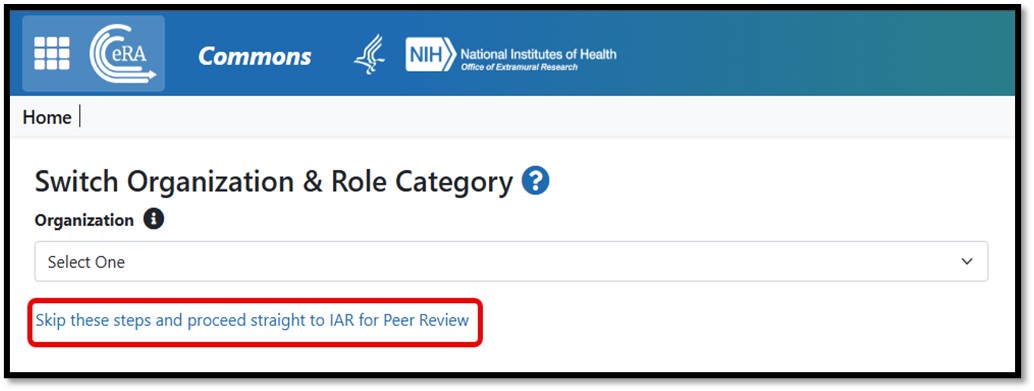
To ensure Reviewers can easily access their Peer Review meetings and materials an option
to 'Skip these steps and proceed straight to IAR for Peer Review' is included on
the Switch Organization & Role Category screen. This option can be selected at any
time and will bypass the need to select both Organization and Role Category.
[Switch Organization and Role Category Screen highlighting the option for Reviewers to
Skip these steps and proceed straight to IAR for Peer Review.]
Figure 4: Skip Switch Organization & Role Category Selections for Reviewers
Resources:
* eRA Commons Frequently Asked Questions
<https://www.era.nih.gov/faqs.htm#XXVI>
* Using Login.gov with eRA
Modules<https://www.era.nih.gov/register-accounts/access-era-modules-v...
* Two Factor Authentication
Videos<https://www.era.nih.gov/era-training/era-videos.htm#2FA>
* Multiple Account
Consolidation<https://www.era.nih.gov/era-training/era-videos.htm#cons...
(video)
________________________________
Questions? See Need Help<https://www.era.nih.gov/need-help> page. Submit a web
ticket<https://public.era.nih.gov/submithelp>;; or call Toll-free: 1-866-504-9552,
Phone: 301-402-7469. The Service Desk hours are Mon-Fri, 7 a.m. to 8 p.m. ET.
Help us improve our communications! Send<mailto:eRACommunications@mail.nih.gov>
suggestions and feedback.
Learn more. Visit Latest News<https://era.nih.gov/news>;.
To join or leave our listservs, visit our
Subscribe<https://era.nih.gov/about-era/get-connected.htm> page.
[eRA logo]
eRA
NIH Office of Extramural Research
________________________________
To unsubscribe from the ERA-INFORMATION-L list, click the following link:
http://list.nih.gov/cgi-bin/wa.exe?SUBED1=ERA-INFORMATION-L&A=1


46
days inactive
46
days old
rowdy.research@lists.it.utsa.edu
0 comments
1 participants
participants (1)
-
 Evelyn Vanderburg