[Advising] DW Planner: Weird Error

Hello,
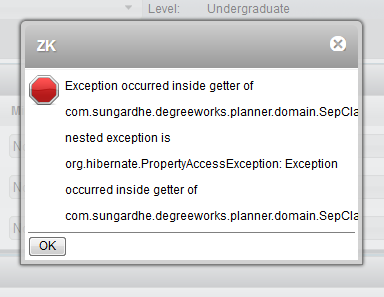
I have gotten a couple of reports of advisors getting the following error when working on
plans:
[cid:image001.png@01D39123.7CE28820]
This seems to happen when you add a course to your plan and then drag/drop it in to
another term without saving first. Remember how we used to have to save a course before
you could add a note? Well, this is like that. Editor's note: this problem was
removed with the upgrade.
So, add all your courses to a semester, save your plan, then you can move stuff from one
place to another if you'd like.
SAVE OFTEN. This allows you to narrow down where a problem could be PLUS if DW goes down,
you don't have to redo a lot. Just a little.
If you have forgotten to save your plan before moving a course and you get the error, you
do not have to start over, you simply need to delete the course that you moved. It should
let you save and then you can add it again.
If you have any questions, email us at
DegreeWorks@utsa.edu<mailto:DegreeWorks@utsa.edu>.
It's Friday! Let's be happy about that.
Amanda Garcia
Program Coordinator
Advising Technology
University of Texas at San Antonio
210-458-6519 (phone)
P.S. SAVE OFTEN
Attachments:
- attachment.htm (text/html — 6.2 KB)
- image001.png (image/png — 17.9 KB)