[Advising] Banner Instructions

Good morning,
If you are experiencing trouble with Banner, please follow the instructions below to
upgrade your Java. This should resolve the issue.
If you are still having trouble after following the instructions, call OIT at x5555.
There is a wait time but they have been able to get most people back up and running.
If you do not use AppWorx, ignore the part about the new link.
Regards,
Amanda Garcia
Program Coordinator
Advising Technology
University of Texas at San Antonio
210-458-6519 (phone)
From: Office of Information Technology - Customer Relations and Communications
Sent: Thursday, January 04, 2018 3:34 PM
Subject: AppWorx Upgrade to Version 9 - Tomorrow, January 5th, 2018
Dear Colleague,
The AppWorx application service will be upgraded from version 8 to version 9 tomorrow,
Friday, January 5th, 2018 from 8:00 a.m. to 11:00 a.m. During this timeframe, the AppWorx
service will be unavailable.
The upgrade to version 9 is required as support for version 8 ends on March 31, 2018. You
should not notice any differences with the look and feel of the new version; however, you
will need to update Java to version 8u121.
How to Update Java
Please follow the attached instructions to upgrade Java on your machine and configure it
to work with both Banner and AppWorx.
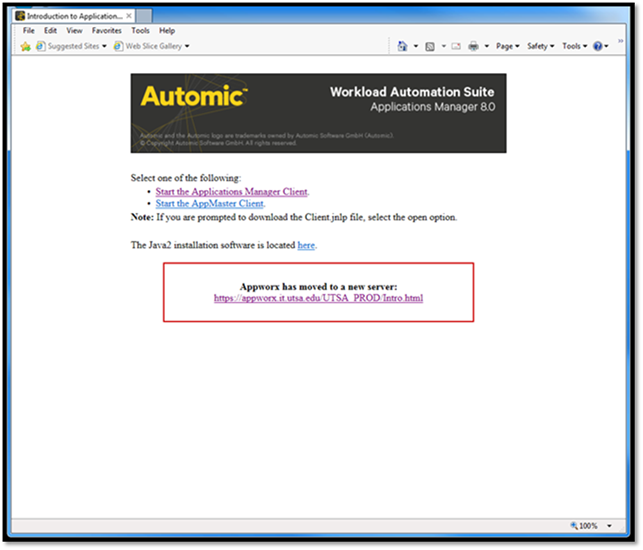
New AppWorx Link
After the upgrade to version 9 is complete, the link to access the AppWorx application
will change to: https://appworx.it.utsa.edu/UTSA_PROD/Intro.html
Note: Please update your bookmarks, as the old Appworx link will only be accessible for a
limited time.
[cid:image003.png@01D38563.04111040]
For any technical questions related to the AppWorx upgrade, please contact OITConnect at
oitconnect@utsa.edu<mailto:oitconnect@utsa.edu> or by calling 458-5555.
Thank you,
The Office of Information Technology
(210) 458-5555
OITConnect@UTSA.edu<mailto:OITConnect@UTSA.edu>
[OITLogoLeftStackedSmall]
Attachments:
- attachment.htm (text/html — 9.5 KB)
- image003.png (image/png — 18.1 KB)
- image004.png (image/png — 103.4 KB)
- Appworx9UpgradeInstructions.pdf (application/pdf — 363.8 KB)