SSC refresher tips - Student Appointment
- First Post
- Replies
- Stats
-
Go to
- ----- 2026 -----
- April
- March
- February
- January
- ----- 2025 -----
- December
- November
- October
- September
- August
- July
- June
- May
- April
- March
- February
- January
- ----- 2024 -----
- December
- November
- October
- September
- August
- July
- June
- May
- April
- March
- February
- January
- ----- 2023 -----
- December
- November
- October
- September
- August
- July
- June
- May
- April
- March
- February
- January
- ----- 2022 -----
- December
- November
- October
- September
- August
- July
- June
- May
- April
- March
- February
- January
- ----- 2021 -----
- December
- November
- October
- September
- August
- July
- June
- May
- April
- March
- February
- January
- ----- 2020 -----
- December
- November
- October
- September
- August
- July
- June
- May
- April
- March
- February
- January
- ----- 2019 -----
- December
- November
- October
- September
- August
- July
- June
- May
- April
- March
- February
- January
- ----- 2018 -----
- December
- November
- October
- September
- August
- July
- June
- May
- April
- March
- February
- January
- ----- 2017 -----
- December
- November
- October
- September
- August
- July
- June
- May
- April
- March
- February
- January
- ----- 2016 -----
- December
- November
- October
- September
- August
- July
- June
- May
- April
- March
- February
- January
- ----- 2015 -----
- December
- November
- October
- September
- August
- July
- June
- May
- April
- March
- February
- January
- ----- 2014 -----
- December
- November
- October
- September
- August
- July
- June
- May
- April
- March
- February
- January
- ----- 2013 -----
- December
- November

Happy Friday to All!
Please be aware of the resources that are available to you if you have any questions abour
SSC. The SSC Foundation Guide can be found on the I:drive/Academic Advising/EAS-SSC/SSC
User-Guide. You can also go to EAB.com and click on advising resources.
Or you can e-mail/call Monica Glover or Sylvia Mansour with questions, concerns,
suggestions
________________________________
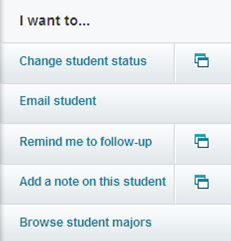
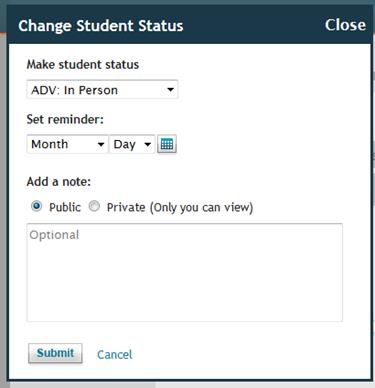
4 Simple Steps to document a STUDENT APPOINTMENT in SSC:
It is encouraged to put notes the same day of the appointment, otherwise your statistics
will not show the correct activity data in a specific time frame
[1. In the student's overview click ' Change student
status'][cid:image003.png@01D18BF2.3197E640][cid:image004.png@01D18BF2.3197E640]
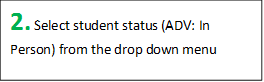
[3. Add notes here][cid:image007.png@01D18BF2.3197E640][2. Select student status (ADV: In
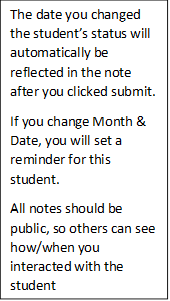
Person) from the drop down menu][The date you changed the student's status will
automatically be reflected in the note after you clicked submit. If you change Month
& Date, you will set a reminder for this student. All notes should be public, so
others can see how/when you interacted with the
student][cid:image012.png@01D18BF2.3197E640][cid:image013.png@01D18BF2.3197E640][cid:image014.jpg@01D18BF2.3197E640]
[4. Click submit to save student's status]
Attachments:
- attachment.htm (text/html — 15.7 KB)
- image001.emz (application/octet-stream — 1.4 KB)
- image002.png (image/png — 1.6 KB)
- image003.png (image/png — 452 bytes)
- image004.png (image/png — 28.5 KB)
- image005.emz (application/octet-stream — 1.1 KB)
- image006.png (image/png — 848 bytes)
- image007.png (image/png — 466 bytes)
- image008.emz (application/octet-stream — 1.4 KB)
- image009.png (image/png — 1.9 KB)
- image010.emz (application/octet-stream — 2.0 KB)
- image011.png (image/png — 5.3 KB)
- image012.png (image/png — 412 bytes)
- image013.png (image/png — 508 bytes)
- image014.jpg (image/jpeg — 16.0 KB)
- image015.emz (application/octet-stream — 1.2 KB)
- image016.png (image/png — 1.3 KB)







3655
days inactive
3655
days old
0 comments
1 participants
tags (0)
participants (1)
-
 advising@lists.sis.utsa.edu