- First Post
- Replies
- Stats
-
Go to
- ----- 2026 -----
- April
- March
- February
- January
- ----- 2025 -----
- December
- November
- October
- September
- August
- July
- June
- May
- April
- March
- February
- January
- ----- 2024 -----
- December
- November
- October
- September
- August
- July
- June
- May
- April
- March
- February
- January
- ----- 2023 -----
- December
- November
- October
- September
- August
- July
- June
- May
- April
- March
- February
- January
- ----- 2022 -----
- December
- November
- October
- September
- August
- July
- June
- May
- April
- March
- February
- January
- ----- 2021 -----
- December
- November
- October
- September
- August
- July
- June
- May
- April
- March
- February
- January
- ----- 2020 -----
- December
- November
- October
- September
- August
- July
- June
- May
- April
- March
- February
- January
- ----- 2019 -----
- December
- November
- October
- September
- August
- July
- June
- May
- April
- March
- February
- January
- ----- 2018 -----
- December
- November
- October
- September
- August
- July
- June
- May
- April
- March
- February
- January
- ----- 2017 -----
- December
- November
- October
- September
- August
- July
- June
- May
- April
- March
- February
- January
- ----- 2016 -----
- December
- November
- October
- September
- August
- July
- June
- May
- April
- March
- February
- January
- ----- 2015 -----
- December
- November
- October
- September
- August
- July
- June
- May
- April
- March
- February
- January
- ----- 2014 -----
- December
- November
- October
- September
- August
- July
- June
- May
- April
- March
- February
- January
- ----- 2013 -----
- December
- November

It has been brought to our attention that the Save As PDF button is not working in
DegreeWorks. We have notified OIT to look in to it. As soon as it is back up we will let
you know.
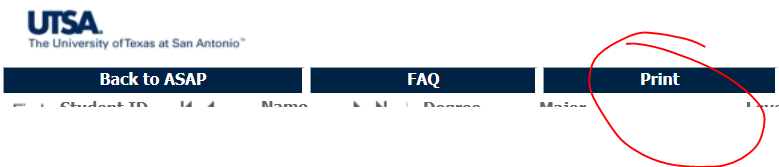
In the meantime you can Print to PDF by clicking on Print and selecting Adobe PDF as your
printer. I know the resulting PDF does not have the color coding like the PDF button
does, but we're hoping this is just a VERY temporary situation.
Be sure and use the Print button at the top of DW and don't go File--> Print.
[cid:image001.png@01D4713A.AA0CE280]
Regards,
Amanda Garcia
Program Coordinator
Advising Administration
University of Texas at San Antonio
210-458-6519
Attachments:
- attachment.htm (text/html — 4.5 KB)
- image001.png (image/png — 21.1 KB)
2710
days inactive
2710
days old
0 comments
1 participants
tags (0)
participants (1)
-
 advising@lists.it.utsa.edu