DegreeWorks Planner Error
- First Post
- Replies
- Stats
-
Go to
- ----- 2026 -----
- April
- March
- February
- January
- ----- 2025 -----
- December
- November
- October
- September
- August
- July
- June
- May
- April
- March
- February
- January
- ----- 2024 -----
- December
- November
- October
- September
- August
- July
- June
- May
- April
- March
- February
- January
- ----- 2023 -----
- December
- November
- October
- September
- August
- July
- June
- May
- April
- March
- February
- January
- ----- 2022 -----
- December
- November
- October
- September
- August
- July
- June
- May
- April
- March
- February
- January
- ----- 2021 -----
- December
- November
- October
- September
- August
- July
- June
- May
- April
- March
- February
- January
- ----- 2020 -----
- December
- November
- October
- September
- August
- July
- June
- May
- April
- March
- February
- January
- ----- 2019 -----
- December
- November
- October
- September
- August
- July
- June
- May
- April
- March
- February
- January
- ----- 2018 -----
- December
- November
- October
- September
- August
- July
- June
- May
- April
- March
- February
- January
- ----- 2017 -----
- December
- November
- October
- September
- August
- July
- June
- May
- April
- March
- February
- January
- ----- 2016 -----
- December
- November
- October
- September
- August
- July
- June
- May
- April
- March
- February
- January
- ----- 2015 -----
- December
- November
- October
- September
- August
- July
- June
- May
- April
- March
- February
- January
- ----- 2014 -----
- December
- November
- October
- September
- August
- July
- June
- May
- April
- March
- February
- January
- ----- 2013 -----
- December
- November

Hello all,
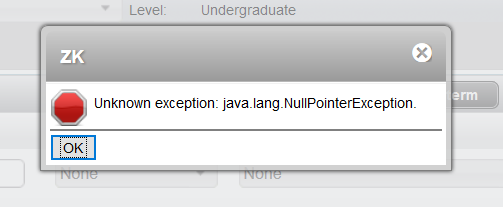
There is an error populating in the planner that looks like this:
[cid:image001.png@01D4705B.DAA183E0]
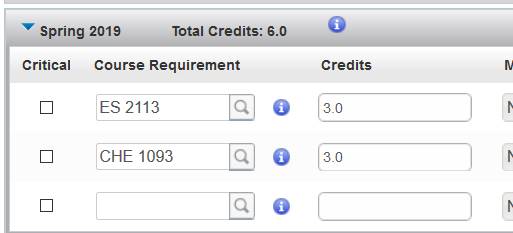
This happens when your plan has a course that the student hasn't met a pre-req for AND
you add a blank row to the plan but delete it without putting a course in that blank row.
To prevent this, if you add a row to your plan add course information in it. It
doesn't matter what the course is. Then you can delete it.
Now With Pictures!
What NOT To Do
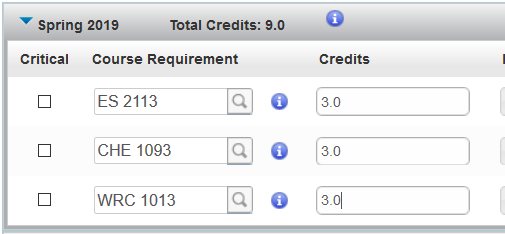
1. Add a course to the plan that the student does not meet the pre-req (in this case
CHE 1093)
[cid:image003.jpg@01D4705F.39F02330]
2. Add a blank row
[cid:image005.jpg@01D4705F.39F02330]
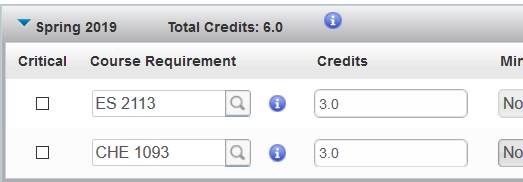
3. "Oh, wait! They don't need another course after all!" Delete empty
row.
[cid:image003.jpg@01D4705F.39F02330]
4. Click Save button. Get error. Sad panda. :(
[cid:image001.png@01D4705B.DAA183E0]
What TO Do
1. Add a course to the plan that the student does not meet the pre-req (in this case
CHE 1093).
[cid:image003.jpg@01D4705F.39F02330]
2. Add a blank row.
[cid:image005.jpg@01D4705F.39F02330]
3. "Oh, wait! They don't need another course after all!" Enter in any
course information in the empty row.
[cid:image008.png@01D4705C.8D7193C0]
4. Delete the row with the course you don't need.
[cid:image003.jpg@01D4705F.39F02330]
5. Click the Save button. You will get your pop up saying the student doesn't
meet a pre-req. You click OK. Your plan saves. All is well. :)
In case you forget and get the NullPointException error, what you need to do is delete the
course the student doesn't meet the pre-req for and the plan will let you save.
Save Often!
This will allow you to zero in on any issues.
One More Thing...
If you see a pre-req warning on a student's plan and it shouldn't be there
(because the student meets the pre-req or the course has no pre-req) please email us with
the student ID and the issue with the pre-req. We will take a look at it and
troubleshoot. Conversely, if there should be a warning and you get none, let us know that
too.
If you have any questions or experience any other problems, please email us at
DegreeWorks@utsa.edu<mailto:DegreeWorks@utsa.edu>.
Regards,
Amanda Garcia
Program Coordinator
Advising Administration
University of Texas at San Antonio
210-458-6519
Attachments:
- attachment.htm (text/html — 18.1 KB)
- image001.png (image/png — 17.8 KB)
- image008.png (image/png — 17.2 KB)
- image003.jpg (image/jpeg — 13.0 KB)
- image005.jpg (image/jpeg — 15.9 KB)
2711
days inactive
2711
days old
0 comments
1 participants
tags (0)
participants (1)
-
 advising@lists.it.utsa.edu