Adding Notes to Planner in DegreeWorks
- First Post
- Replies
- Stats
-
Go to
- ----- 2026 -----
- April
- March
- February
- January
- ----- 2025 -----
- December
- November
- October
- September
- August
- July
- June
- May
- April
- March
- February
- January
- ----- 2024 -----
- December
- November
- October
- September
- August
- July
- June
- May
- April
- March
- February
- January
- ----- 2023 -----
- December
- November
- October
- September
- August
- July
- June
- May
- April
- March
- February
- January
- ----- 2022 -----
- December
- November
- October
- September
- August
- July
- June
- May
- April
- March
- February
- January
- ----- 2021 -----
- December
- November
- October
- September
- August
- July
- June
- May
- April
- March
- February
- January
- ----- 2020 -----
- December
- November
- October
- September
- August
- July
- June
- May
- April
- March
- February
- January
- ----- 2019 -----
- December
- November
- October
- September
- August
- July
- June
- May
- April
- March
- February
- January
- ----- 2018 -----
- December
- November
- October
- September
- August
- July
- June
- May
- April
- March
- February
- January
- ----- 2017 -----
- December
- November
- October
- September
- August
- July
- June
- May
- April
- March
- February
- January
- ----- 2016 -----
- December
- November
- October
- September
- August
- July
- June
- May
- April
- March
- February
- January
- ----- 2015 -----
- December
- November
- October
- September
- August
- July
- June
- May
- April
- March
- February
- January
- ----- 2014 -----
- December
- November
- October
- September
- August
- July
- June
- May
- April
- March
- February
- January
- ----- 2013 -----
- December
- November

Hi All,
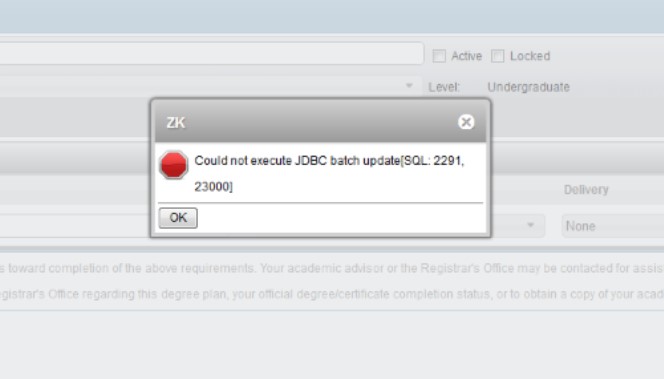
Regarding adding notes in the planner in DegreeWorks: The plan needs to be saved prior to
adding the note. If you add a course, then the note and try to save, there are times
where there is an error that pops up that looks like this:
[cid:image001.jpg@01D12B7E.9F7E6730]
To avoid this, add the course-->click save-->add the note. You should be able to
add all the courses, save the plan and then add notes and save at that time. This would
allow you to click on the save button twice rather than each time. Of course, it is safer
to save more often. If you have questions, please email us at
DegreeWorks@utsa.edu<mailto:DegreeWorks@utsa.edu> or feel free to call me at x6519.
Send the ID number of the student if you do email.
Regards,
Amanda Garcia
Program Coordinator
Undergraduate Studies Support and Technology Services
University of Texas at San Antonio
210-458-6519 (phone)
Attachments:
- attachment.htm (text/html — 3.8 KB)
- image001.jpg (image/jpeg — 27.4 KB)
3776
days inactive
3776
days old
0 comments
1 participants
tags (0)
participants (1)
-
 advising@lists.sis.utsa.edu