
10:08 p.m.
From: Inspire Support
Sent: Tuesday, March 2, 2021 4:06 PM
Subject: Civitas Inspire Updates
Good afternoon,
Inspire has recently had some important updates. Please share this information with the
faculty and staff who are members of your Student Success Unit (SSU) in Inspire.
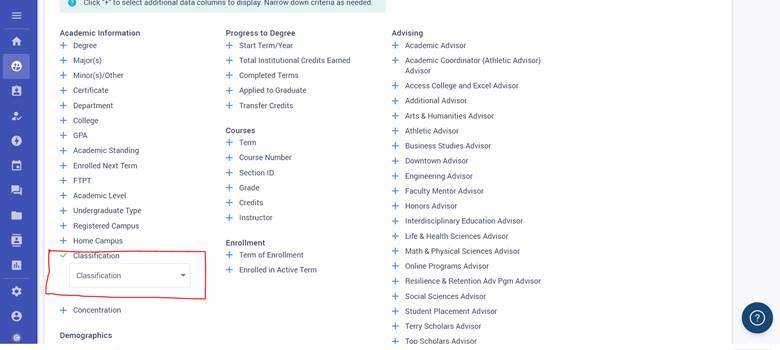
Classification Filter
Students can now be filtered by their classification. Using Inspire's Advanced Search
function, go to the Academic Information section of the page. You will now see a new
filter labeled "Classification" in the listing. Clicking on the dropdown menu,
you can filter students according to their classification.
[cid:image001.jpg@01D70F7E.3797A520]
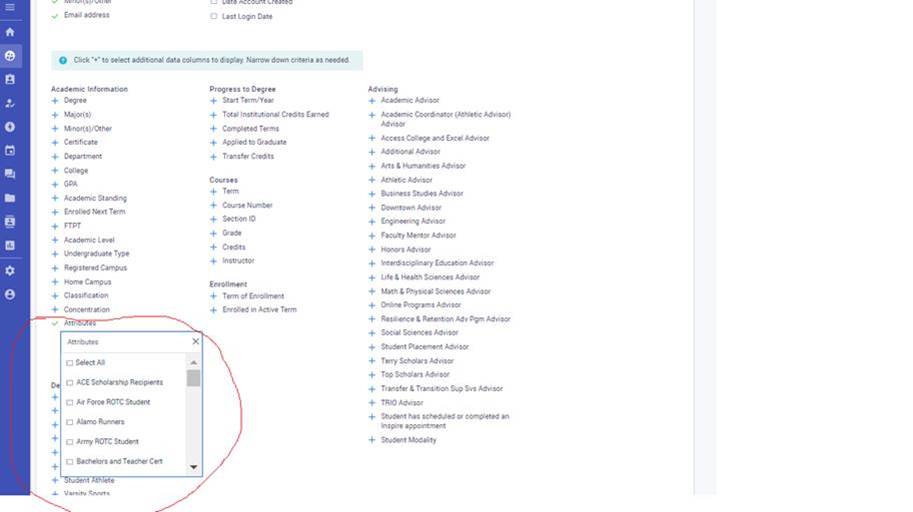
Attributes Filter
Students can also be filtered by attributes. Using Inspire's Advanced Search function,
go to the Academic Information section of the page. You will now see a new filter labeled
"Attributes" in the listing. Clicking on the dropdown menu, you can filter
students according to attributes.
[cid:image002.jpg@01D70F7E.3797A520]
Static Group Upload
If you wish to share static groups in Inspire with specific individuals, you can do so by
utilizing the list upload functionality. To do so, you will need to create and export the
list and then email the exported document to those you wish to share it with. Those other
individuals can import the list you have shared into their Inspire account.
This process is explained in further detail via the Civitas Hub at
https://hub.civitaslearning.com/support/solutions/articles/36000261567-up...;.
EAB Navigate Historical Data
The migration of historical notes, attachments, and appointment summaries from EAB
Navigate to Civitas Inspire is now complete. To access this information in the platform:
1. Login to Inspire
2. Under ADVISE tab, select "Advising Notes"
3. Under left hand navigation select "All Advising Notes"
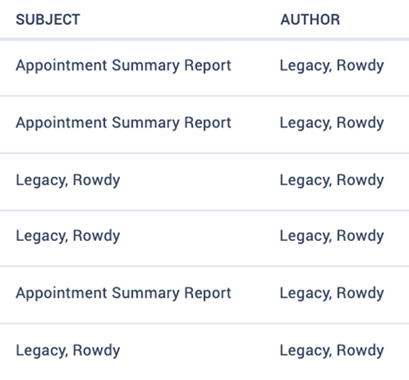
4. Review: The author of all the attachments will reflect, "Legacy, Rowdy"
(Note: The historical data will be tied to the student's profile, not the
Advisor's)
5. Attachment Only = Legacy, Rowdy as the Subject
6. Appointment Summary Report = Appointment Summary Report as the Subject
[cid:image003.png@01D70F7E.3797A520]
More updates are coming soon and will be communicated when they are implemented into
Inspire.
Please continue to contact InspireSupport@UTSA.edu<mailto:InspireSupport@UTSA.edu>
with all Inspire-related questions.
Thank you,
UTSA Inspire Support
1857
days inactive
1857
days old
0 comments
1 participants
participants (1)
-
 advising@lists.it.utsa.edu