Printing Notes View in Planner
- First Post
- Replies
- Stats
-
Go to
- ----- 2026 -----
- April
- March
- February
- January
- ----- 2025 -----
- December
- November
- October
- September
- August
- July
- June
- May
- April
- March
- February
- January
- ----- 2024 -----
- December
- November
- October
- September
- August
- July
- June
- May
- April
- March
- February
- January
- ----- 2023 -----
- December
- November
- October
- September
- August
- July
- June
- May
- April
- March
- February
- January
- ----- 2022 -----
- December
- November
- October
- September
- August
- July
- June
- May
- April
- March
- February
- January
- ----- 2021 -----
- December
- November
- October
- September
- August
- July
- June
- May
- April
- March
- February
- January
- ----- 2020 -----
- December
- November
- October
- September
- August
- July
- June
- May
- April
- March
- February
- January
- ----- 2019 -----
- December
- November
- October
- September
- August
- July
- June
- May
- April
- March
- February
- January
- ----- 2018 -----
- December
- November
- October
- September
- August
- July
- June
- May
- April
- March
- February
- January
- ----- 2017 -----
- December
- November
- October
- September
- August
- July
- June
- May
- April
- March
- February
- January
- ----- 2016 -----
- December
- November
- October
- September
- August
- July
- June
- May
- April
- March
- February
- January
- ----- 2015 -----
- December
- November
- October
- September
- August
- July
- June
- May
- April
- March
- February
- January
- ----- 2014 -----
- December
- November
- October
- September
- August
- July
- June
- May
- April
- March
- February
- January
- ----- 2013 -----
- December
- November

From: Amanda Garcia
Sent: Monday, May 23, 2016 10:41 AM
To: 'advising(a)lists.sis.utsa.edu'
<advising@lists.sis.utsa.edu<mailto:advising@lists.sis.utsa.edu>>
Subject: Printing Notes View in Planner
Hello all,
We have been notified by several people that when they go to print the Notes View in the
planner that the notes do not print. It seems that a recent update of Firefox is causing
this issue. We will contact OIT and try and find a resolution. In the interim, use
Chrome when using Degree Works, as the notes will print when using that browser.
If you do not have it on your computer, you can download it from here:
https://www.google.com/chrome/browser/desktop/index.html. If you are unable to download
it, contact OIT and they can download it for you.
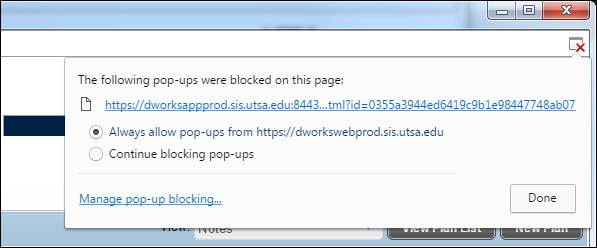
Note: You will probably have a pop-up blocker set up in Chrome and will need to allow
pop-ups from Degree Works when you first try to print in that browser.
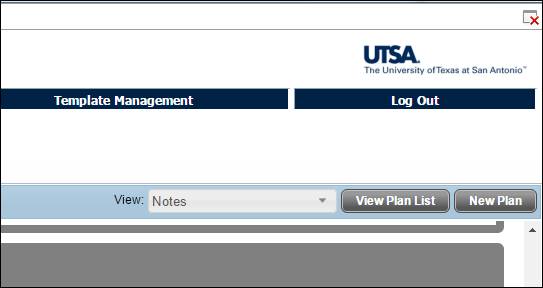
- [cid:image001.png@01D1B4DF.A0C9C720] When you click on the print button, you
will see an X in the top right corner
[cid:image003.jpg@01D1B4DF.A0C9C720]
- Click on the X and select the "Always allow pop-ups from ..." option
and click on 'Done'.
[cid:image005.jpg@01D1B4DF.A0C9C720]
- Hit the print button again and you should be allowed to print at that time.
Please email us at DegreeWorks@utsa.edu<mailto:DegreeWorks@utsa.edu> if you have any
questions.
Regards,
Amanda Garcia
Program Coordinator
Undergraduate Studies Support and Technology Services
University of Texas at San Antonio
210-458-6519 (phone)
Attachments:
- attachment.htm (text/html — 9.6 KB)
- image001.png (image/png — 274 bytes)
- image003.jpg (image/jpeg — 18.9 KB)
- image005.jpg (image/jpeg — 20.4 KB)

3598
days inactive
3598
days old
0 comments
1 participants
tags (0)
participants (1)
-
 advising@lists.sis.utsa.edu