
2:58 p.m.
Hello all,
There will be a change made this weekend that will have pre-requisite checking going
through DegreeWorks rather than Banner. So, starting Monday, when you add courses to a
student's plan, if the student doesn't meet the pre-requisite or co-requisite, you
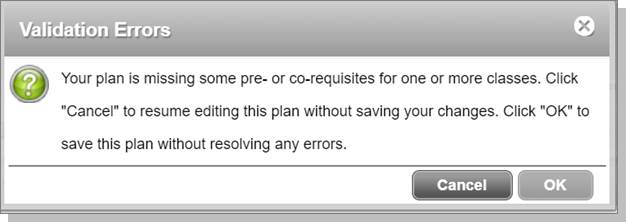
will get a warning in the planner that they don't meet the pre-req. The warning looks
like this:
[cid:image001.png@01D7B44F.5D7C4400]
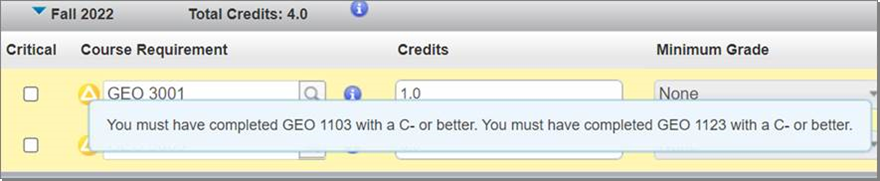
And you'll also see yellow around the course(s) that has the pre-req error. If you
hover your mouse over the triangle icon, it tells you specifically what pre-req the
student is missing.
[cid:image002.png@01D7B44F.5D7C4400][cid:image003.png@01D7B44F.5D7C4400]
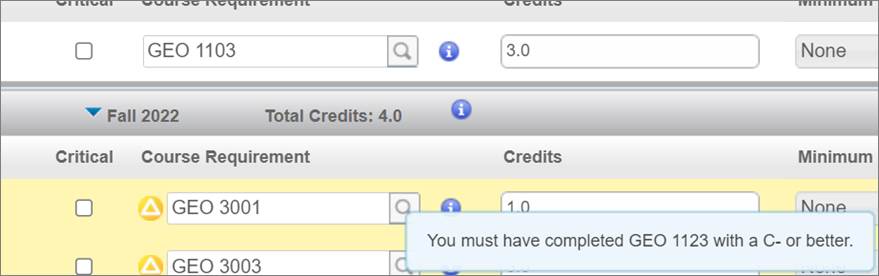
If this student has completed GEO 1103, or if it was added to the plan in an earlier term,
then you'd only see the GEO 1123 show up in the message box like so:
[cid:image004.png@01D7B44F.5D7C4400][cid:image005.jpg@01D7B44F.5D7C4400]
Degree Works will allow you to leave the course there, even if they aren't meeting the
pre-req (by clicking OK when the error pops up.) Maybe they're taking the pre-req
elsewhere? There could be different scenarios where it's okay to have it there.
It'll just give you that warning. Also, a pre-requisite does not have to be on the
plan, if they've already taken the course and it's in Banner. You do not have to
add courses they've previously taken to a student's plan to avoid the warning.
Once you give the student an override, you will still get the warning. But, the student
will be able to register (so long as you give the correct override.)
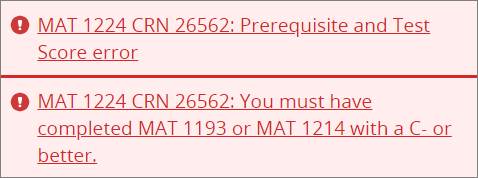
If a student attempts to register for a course in ASAP that they don't meet the
pre-req or co-req for, ASAP will tell them specifically what they're missing rather
than just a generic "Pre-Requisite and Test Score Error." Example picture
below:
[cid:image006.jpg@01D7B44F.5D7C4400]
If there is an exception in Degree Works, the pre-req checker does not look at that. You
still need to give an override in Banner.
Speaking of overrides, if you give one for a course, and another class they need to take
relies on that course for registration/pre-/co-req purposes, you need to give an override
for that course too. Here's an example: If you give an override for PHY 1603 and the
student plans on registering in PHY 1611, you need to give an override for both courses.
If the student registers in PHY 1603 with the override, they will get an error if they try
and register for PHY 1611 without its own override. So, as you see students that are in
this situation, it would be a good idea to give them the overrides now so they don't
contact you with registration issues come November.
If you have any questions about this, please send me an email or message me via Teams.
Regards,
Amanda Garcia
Senior Registrar Officer
Registrar's Office | The University of Texas at San Antonio
One UTSA Circle, San Antonio, TX 78249
210-458-7599
Amanda.Garcia@utsa.edu<mailto:Amanda.Garcia@utsa.edu>
Students: Please be sure to include your Banner ID or MyUTSA ID when corresponding with
UTSA officials.
CONFIDENTIAL COMMUNICATION: This email and any file transmitted with it may contain
confidential information intended solely for the use of the individual or entity to which
it is addressed. If you are not the intended recipient or the delegate responsible for
delivering the communication to the intended recipient, please be advised that you have
received this communication in error and that any disclosure, copying, distribution,
printing or use of this information is strictly prohibited; please notify the sender
immediately of the error.


1647
days inactive
1647
days old
0 comments
1 participants
participants (1)
-
 advising@lists.it.utsa.edu