4:25 p.m.
Welcome back COEHD community ~ We hope you all have a wonderful winter break!
Over the holidays UTS implemented a UTSA-wide passphrase
reset<https://www.utsa.edu/today/2020/12/story/uts-passphrase-reset.ht...;,
Therefore, everyone must reset their passphrase.
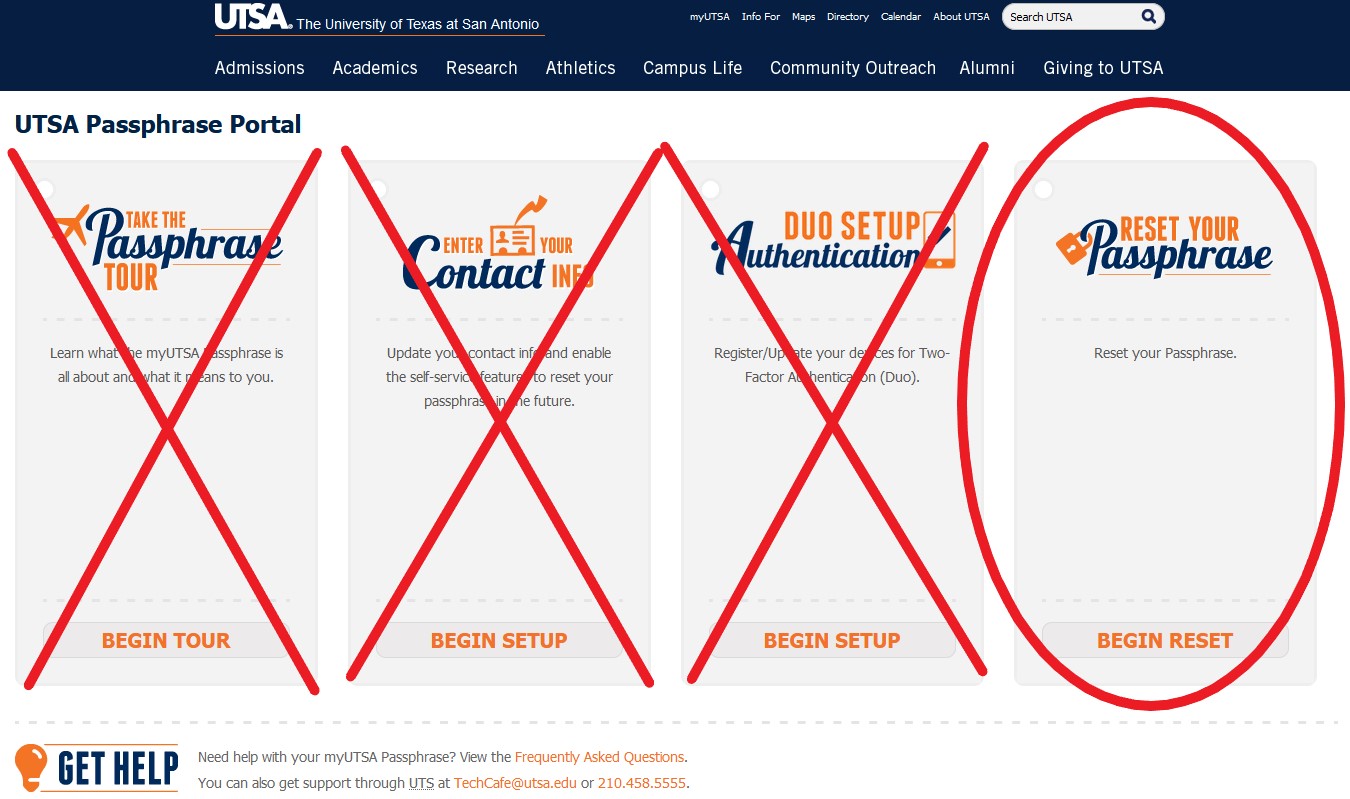
Please share with anyone having issues accessing their email. You might have to text them
- the image attached will help.
* Go to Passphrase.utsa.edu and click on “Reset your passphrase” (imaged attached).
* Follow the prompts (read below).
Please reach out to 210-458-5555 for TechCafe assistance or 210-458-4035 for COEHD IT
assistance.
Thank you and Enjoy your week!
Marisol Johnson
IT Operations Manager
Office of the Dean
COEHD IT Resources for Working
Remotely<https://education.utsa.edu/about/technology-support-services/...
From: UTSA University Technology Solutions <uts(a)e.utsa.edu>
Reply-To: UTSA University Technology Solutions
<reply-febd1679716d077a-353_HTML-62045198-100012500-108(a)e.utsa.edu>
Date: Monday, December 21, 2020 at 9:20 PM
To: Marisol Johnson <Marisol.Johnson(a)utsa.edu>
Subject: Passphrase Reset Required
...
[UTSA]
Dear Roadrunners,
As we move into winter break, University Technology Solutions will be conducting
additional maintenance on our systems and servers. Concurrent with this process, members
of the university community will need to create new passphrases to access their UTSA
accounts.
As of 10:30 p.m. today, current user passphrases will expire and it will be necessary to
select a new password. Please take the following steps after 10:30 p.m. today or during
the holiday break:
· Go to the UTSA Passphrase Portal
(http://passphrase.utsa.edu<https://nam11.safelinks.protection.outlook....;)
· Click on “Begin Reset” in the “Reset Your Passphrase” tile
· Follow the prompts to enter your myUTSA ID and enter either your contact phone
number or non-UTSA email address as your contact information selection.
· Follow the prompts to send your passphrase request to either your contact
telephone number or non-UTSA email address. You have a two-hour timeframe before the
passphrase request expires.
[http://image.e.utsa.edu/lib/fe4615707564057f701470/m/2/616e59b6-d0b0-499b...
Note: In order to utilize the UTSA Passphrase Portal to reset your passphrase, you must
have already set up your passphrase reset contact information (cellphone number and/or
non-UTSA email address). If you have not set up your passphrase reset contacts, you will
not be able to reset your passphrase using the Passphrase Portal. Please contact Tech Café
at 210-458-5555.
As an academic leader in cybersecurity, UTSA maintains a culture of awareness of cyber
security trends and best practices to protect the integrity of our systems. We
periodically recommend passphrase resets as part of our cyber hygiene.
Thank you for your assistance.
[http://image.e.utsa.edu/lib/fe4615707564057f701470/m/1/131040ec-a264-4c97...]
[UTSA]
The University of Texas at San Antonio
One UTSA Circle, San Antonio, TX, 78249
You are receiving this email because of your affiliation with The University of Texas at
San Antonio. You can also view this email
online<https://nam11.safelinks.protection.outlook.com/?url=http%3A%2F%...;.
For the most up to date information on your student account, log into your
ASAP<https://nam11.safelinks.protection.outlook.com/?url=http%3A%2F%2F...
student portal.